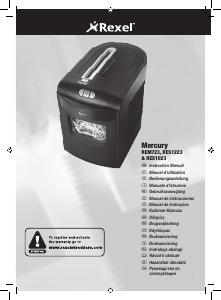
Manuál Rexel Mercury RLX20 Skartovačka

Potřebujete manuál pro svůj Rexel Mercury RLX20 Skartovačka? Níže si můžete zdarma prohlédnout a stáhnout PDF manuál v češtině. Tento produkt má aktuálně 2 často kladené otázky, 1 komentář a má 0 hlasů. Pokud toto není manuál, který chcete, kontaktujte nás.

Je váš výrobek vadný a manuál nenabízí žádné řešení? Přejděte do Repair Café a získejte opravu zdarma.

Manuál

Loading…
5
G
Door Open Safety Function
If the door is opened during shredding as a safety precaution
the shredder will instantly stop, and the door open symbol on
the indicator panel will ash red. To turn back to auto mode
simply press the auto button again (f).
Mercury Anti-Jam Technology
Mercury Shredders will only shred stacks of paper that are
within the shredders sheet capacity. For example, a shredder
with a capacity of 22 sheets will not allow the shredding of
more sheets than this.
Sensors in the paper feed area measure the thickness of
paper about to be shredded. The ability to shred or not is
communicated through red and green lighting. Green means
that the stack of paper is within the shredders sheet capacity
and OK to shred. Red means that you have too much paper,
remove some sheets in order to shred.
Given that you are unable to shred more sheets of paper
than the shredder is capable of shredding, paper jams are
prevented.
This prevents time wasted through reversing paper and
unblocking jams not to mention the mess it can create.
Rare Occasions of Jamming
In the unlikely event of the shredder jamming, use the reverse
function to unblock the shredder.
Alternating between the reverse and continuous forward
functions will help unblock the feed area.
Initial Setup
The shredder is designed to automatically lubricate the cutting
mechanism as required to ensure the product continues to
work to its maximum performance and to extend the product
life. Before turning on the machine for the rst time, please
open the oil reservoir cap on the head of the shredder (j) and
pour in the 60ml bottle of oil provided as standard. This is
sufcient to allow the shredder to start for the rst time and
to operate continuously for approximately 1 hour shredding
before the reservoir will need relling. Press and hold down the
Auto button (f) for 5 seconds to start the pump and prime the
system. This operation is only required the very rst time the
shredder is used. When the ‘Oil Rell’ indicator is illuminated
, ip up the oil reservoir cap (j) and rell the oil reservoir
using a bottle of standard Rexel oil (1760049). The automatic
oiling operation lasts approximately 2 seconds and you
will hear the distribution pump during this time. Auto-oiling
operates after 15 minutes of shredding.
Shredder Control Panel
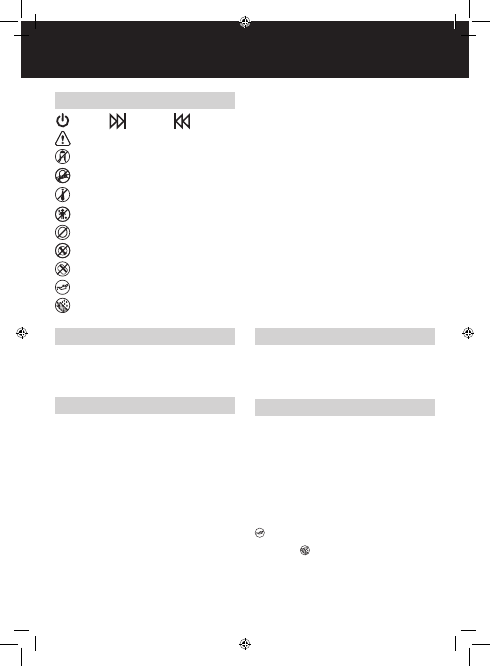
ReverseForwardAuto
Safety First
This means you should be careful because long hair can become
entangled in the cutting head.
This means don’t reach into the feed opening of the cutting head.
This means be careful of ties and other loose clothing which could
become entangled in the cutting head.
This means be careful of loose jewelry which could become
entangeld in the cutting head.
This means keep children away from shredder.
This means do not shred CD’s.
This means oil level.
This means oiling in operation.
This means do not shred credit cards.
Stáhnout manuál v český (PDF, 2.89 MB)
(Zvažte dopad na životní prostředí a tento manuál si vytiskněte pouze v případě, že výtisk skutečně potřebujete)

Loading…

Hodnocení

Ohodnoťte Rexel Mercury RLX20 Skartovačka a dejte nám vědět, co si o výrobku myslíte. Chcete se podělit o své zkušenosti s tímto výrobkem nebo se na něco zeptat? Nechte nám ve spodní části stránky komentář.
Jste spokojeni s Rexel Mercury RLX20 Skartovačka?
Ano Ne
Ohodnoťte tento výrobek jako první
0 hlasy

Zapojte se do konverzace o tomto výrobku

Zde můžete sdílet, co si myslíte o Rexel Mercury RLX20 Skartovačka. Máte-li dotaz, nejprve si pozorně přečtěte návod. Žádost o příručku lze provést pomocí našeho kontaktního formuláře.

wayne morley 05-01-2024
můj REXEL RLX20 přestal fungovat, stisknete tlačítko auto a modrý LED pásek uprostřed bliká a nic se neděje žádné nápady

odpověď | To bylo užitečné (0) (Přeloženo Googlem)

Více o tomto návodu

Chápeme, že je hezké mít k vašemu Rexel Mercury RLX20 Skartovačka papírovou příručku. Manuál si můžete vždy stáhnout z našich webových stránek a vytisknout si jej sami. Pokud byste chtěli mít originální příručku, doporučujeme vám kontaktovat Rexel. Možná by byli schopni poskytnout originální návod. Hledáte příručku ke svému Rexel Mercury RLX20 Skartovačka v jiném jazyce? Vyberte si preferovaný jazyk na naší domovské stránce a vyhledejte číslo modelu, abyste zjistili, zda jej máme k dispozici.

Specifikace

Značka Rexel
Modelka Mercury RLX20
Kategorie Skartovačky
Typ souboru PDF
Velikost souboru 2.89 MB

Všechny návody pro Rexel Skartovačky
Další manuály Skartovačky

Často kladené otázky o Rexel Mercury RLX20 Skartovačka

Náš tým podpory vyhledává užitečné produktové informace a odpovídá na často kladené otázky. Pokud v nich najdete nějakou nepřesnost, kontaktujte nás prostřednictvím našeho kontaktního formuláře.

Proč se můj skartovač po určité době zastaví? Ověřeno

Drtiče papíru musí po chvíli vychladnout, aby nedošlo k přehřátí. Doba, po kterou může zařízení fungovat, než bude nutné vychladnout, se u různých značek a modelů liší.

To bylo užitečné (915) Přečtěte si více

Jak často mám drtič naolejovat? Ověřeno

Při občasném použití postačí naolejování drtiče papíru jednou za dva měsíce. Při (velmi) pravidelném používání si můžete všimnout, že zařízení má potíže s drcením nebo že se papír snadno zasekne. To jsou známky toho, že by měl být stroj naolejován.

To bylo užitečné (576) Přečtěte si více
Manuál Rexel Mercury RLX20 Skartovačka

Související produkty

Související kategorie

×
Download