RQT9699
ENGLISH
6
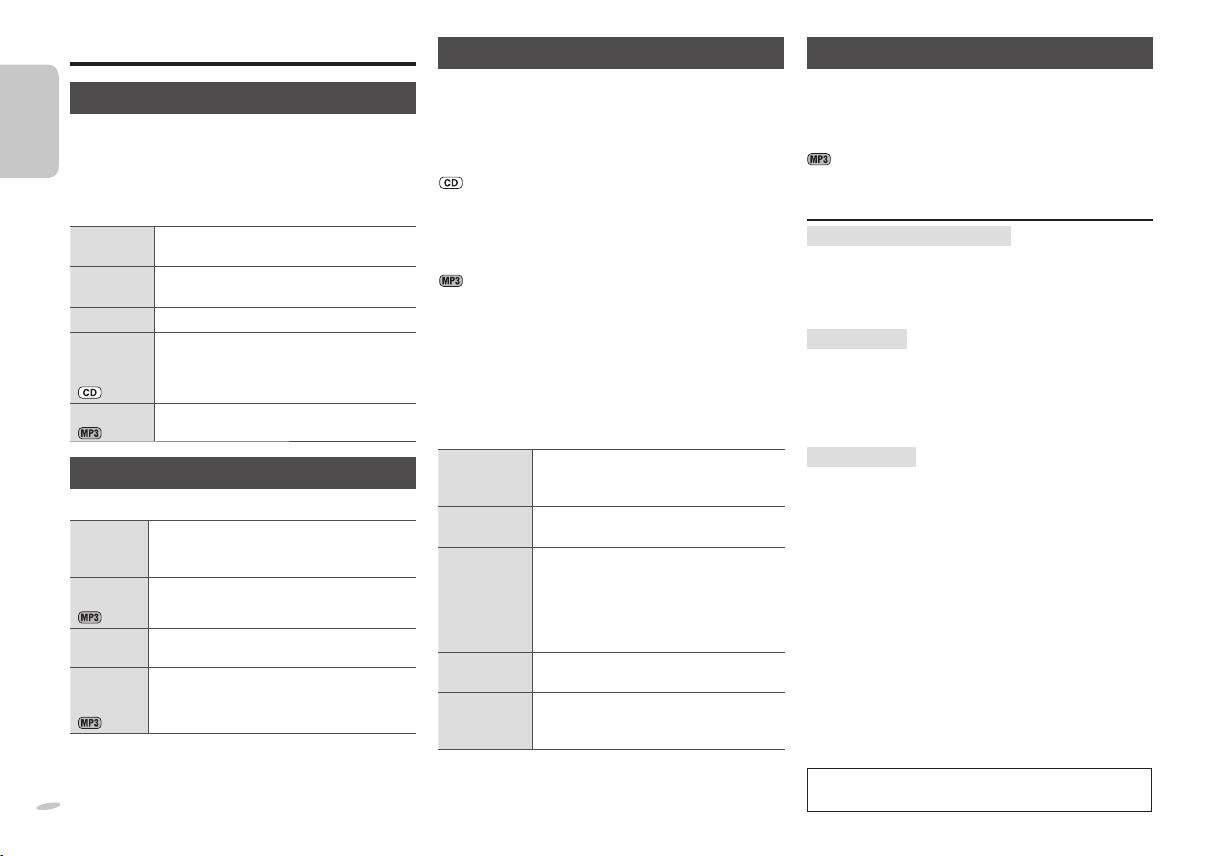
Discs
Basic play
1 Press [ x, OPEN/CLOSE] on the main unit to
open the tray.
The unit turns on, load a disc with the label facing up.
Press [x, OPEN/CLOSE] again to close the tray.
2 Press [4/9, CD] to start play.
Stop
playback
Press [ 8].
Pause play
Press [4/9, CD]. Press again to resume
play.
Skip tracks
Press [ 2/3] or [5/6].
Search
through
tracks
Press and hold [2/3] or [5/6]
during play or pause.
Skip album
Press [ R/T].
Play Mode function
Press [ PLAY MODE] to select the desired mode.
1-TRACK
1TR
Play one selected track on the disc.
Press the numeric buttons to select the
track.
1-ALBUM
1ALBUM
Play one selected album on the disc.
Press [R/T] to select the album.
RANDOM
RND
Play a disc randomly.
1-ALBUM
RANDOM
1ALBUM RND
Play all tracks in one selected album
randomly.
Press [R/T] to select the album.
This function does not work with “Program play”.
Program play
This function allows you to program up to 24 tracks.
1 Press [4/9, CD] and then [8].
2 Press [ PROGRAM].
“PGM” is shown.
3 Press the numeric buttons to select the track.
Repeat this step to program other tracks.
4 Press [4/9, CD] to start play.
3 Press [R/T] to select the album.
4 Press [5/6] once and then the numeric
buttons to select the track.
5 Press [ OK].
6 Repeat steps 3 to 5 to program other tracks.
7 Press [4/9, CD] to start play.
Cancel
program
mode
Press [PROGRAM] in the stop mode.
Replay the
program
Press [PROGRAM] then [4/9, CD] in
the stop mode.
Check
program
contents
Press [2/3] or [5/6] when
“PGM” is displayed in the stop mode.
To check while programming, press
[PROGRAM] twice after “PGM”
appears, then press [2/3] or
[5/6].
Clear the last
track
Press [ DEL] in the stop mode.
Clear all
programmed
tracks
Press [8 ] in the stop mode. “CLR ALL”
is displayed. Within 5 seconds, press
the button again to clear all tracks.
• The program memory is cleared when you open the
disc tray.
• To repeat program play or selected play mode, press
[ REPEAT]. Press again to cancel.
Checking the track information
You can view the information of the current track from the
display panel.
Press [ DISPLAY] during play or pause.
• This unit supports ver. 1.0 and 1.1 ID3 tags.
• Text data that is not supported will not be displayed.
NOTE about using a DualDisc
The digital audio content side of a DualDisc does not
meet the technical specifi cations of the Compact Disc
Digital Audio (CD-DA) format so playback may not be
possible.
NOTE on CDs
• This unit can access up to 99 tracks.
• This unit can play MP3 fi les and CD-DA format audio
CD-R/RW that have been fi nalised.
• It may not be able to play some CD-R/RW due to the
condition of the recording.
NOTE on MP3s
• Files are treated as tracks and folders are treated as
albums.
• This unit can access up to 999 tracks, 255 albums and
20 sessions.
• Disc must conform to ISO9660 level 1 or 2 (except for
extended formats).
• To play in a certain order, prefi x the folder and fi le
names with 3-digit numbers in the order you want them
to play.
Limitations on MP3 play
• If you have recorded MP3s on the same disc as
CD-DA, only the format recorded in the fi rst session
can be played.
• Some MP3s may not be played due to the condition of
the disc or recording.
• Recordings will not necessarily be played in the order
you recorded them.
MPEG Layer-3 audio coding technology licensed from
Fraunhofer IIS and Thomson.
6
SC-PM04_RQT9699-E_EC.indb 6SC-PM04_RQT9699-E_EC.indb 6 4/23/2012 5:28:04 PM4/23/2012 5:28:04 PM


Zapojte se do konverzace o tomto výrobku
Zde můžete sdílet, co si myslíte o Panasonic SC-PM04 Stereo souprava. Máte-li dotaz, nejprve si pozorně přečtěte návod. Žádost o příručku lze provést pomocí našeho kontaktního formuláře.
odpověď | To bylo užitečné (0)