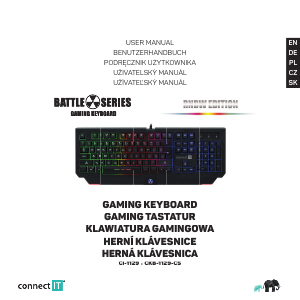
Manuál Connect IT CI-1129 Klávesnice

Potřebujete manuál pro svůj Connect IT CI-1129 Klávesnice? Níže si můžete zdarma prohlédnout a stáhnout PDF manuál v češtině. Tento produkt má aktuálně 2 často kladené otázky, 0 komentářů a má 0 hlasů. Pokud toto není manuál, který chcete, kontaktujte nás.

Je váš výrobek vadný a manuál nenabízí žádné řešení? Přejděte do Repair Café a získejte opravu zdarma.

Manuál

Loading…

EN
USER MANUAL
GAMING KEYBOARD
CI-1129 CKB-1129-CS
·
Before putting this product into operation, please read carefully all the instructions, even if you are already familiar with using similar
products. Use the product only as described in this manual. Keep this manual in case you need it for future reference.
The electronic version of this user manual can be downloaded on the website
www.connectit-europe.com.
We recommend keeping the original packaging of the product, invoice and warranty certifi cate at least for the time the warranty is valid.
When shipping the product, we recommend using the original packaging that the product was delivered in that will provide the best
protection for it from being damaged during transport.
1 Specifi cation
LED illumination (use in low light conditions)
12 multimedia keys
19 anti-ghost keys
Height-adjustable
Standard keyboard layout
Easy Plug & Play installation
Cable length: 180 cm
USB 1.1 and higher
Compatibility:
Operating system: Microsoft Windows XP/Vista/7/8/10 and Mac OS
This product is compatible with Mac OS although some features unsupported by Mac OS may not work properly.
2 Installation
Plug the USB cable into an available USB port on your computer and wait for the drivers to install.
3 Overview
Anti-Ghosting function
Anti-Ghosting prevents phantom key presses.
Windows lock key
The Windows key can be locked or unlocked using the Fn + F11 or Fn + Windows keyboard shortcut.
This function is very important for avid gamers as it prevents unintentional menu selection by pressing the Windows key during the game.
Illumination
Gaming keyboard BATTLE RNBW EDITION has 3 different backlight color variations that you can switch between with the backlight key .
Backlight intensity settings
Increase Fn + PgUp
Decrease Fn + PgDn
EN
USER MANUAL
GAMING KEYBOARD
CI-1129
CKB-1129-CS
·
Before putting this product into operation, please read carefully all the instructions, even if you are already familiar with using similar
products. Use the product only as described in this manual. Keep this manual in case you need it for future reference.
The electronic version of this user manual can be downloaded on the website
www.connectit-europe.com.
We recommend keeping the original packaging of the product, invoice and warranty certifi cate at least for the time the warranty is valid.
When shipping the product, we recommend using the original packaging that the product was delivered in that will provide the best
protection for it from being damaged during transport.
1
Specifi cation
LED illumination (use in low light conditions)
12 multimedia keys
19 anti-ghost keys
Height-adjustable
Standard keyboard layout
Easy Plug & Play installation
Cable length: 180 cm
USB 1.1 and higher
Compatibility:
Operating system: Microsoft Windows XP/Vista/7/8/10 and Mac OS
This product is compatible with Mac OS although some features unsupported by Mac OS may not work properly.
2
Installation
Plug the USB cable into an available USB port on your computer and wait for the drivers to install.
3
Overview
Anti-Ghosting function
Anti-Ghosting prevents phantom key presses.
Windows lock key
The Windows key can be locked or unlocked using the
Fn + F11
or
Fn + Windows
keyboard shortcut.
This function is very important for avid gamers as it prevents unintentional menu selection by pressing the Windows key during the game.
Illumination
Gaming keyboard BATTLE RNBW EDITION has 3 different backlight color variations that you can switch between with the backlight key
.
Backlight intensity settings
Increase
Fn + PgUp
Decrease
Fn + PgDn
Stáhnout manuál v český (PDF, 1.09 MB)
(Zvažte dopad na životní prostředí a tento manuál si vytiskněte pouze v případě, že výtisk skutečně potřebujete)

Loading…

Hodnocení

Ohodnoťte Connect IT CI-1129 Klávesnice a dejte nám vědět, co si o výrobku myslíte. Chcete se podělit o své zkušenosti s tímto výrobkem nebo se na něco zeptat? Nechte nám ve spodní části stránky komentář.
Jste spokojeni s Connect IT CI-1129 Klávesnice?
Ano Ne
Ohodnoťte tento výrobek jako první
0 hlasy

Zapojte se do konverzace o tomto výrobku

Zde můžete sdílet, co si myslíte o Connect IT CI-1129 Klávesnice. Máte-li dotaz, nejprve si pozorně přečtěte návod. Žádost o příručku lze provést pomocí našeho kontaktního formuláře.

Více o tomto návodu

Chápeme, že je hezké mít k vašemu Connect IT CI-1129 Klávesnice papírovou příručku. Manuál si můžete vždy stáhnout z našich webových stránek a vytisknout si jej sami. Pokud byste chtěli mít originální příručku, doporučujeme vám kontaktovat Connect IT. Možná by byli schopni poskytnout originální návod. Hledáte příručku ke svému Connect IT CI-1129 Klávesnice v jiném jazyce? Vyberte si preferovaný jazyk na naší domovské stránce a vyhledejte číslo modelu, abyste zjistili, zda jej máme k dispozici.

Specifikace

Značka Connect IT
Modelka CI-1129
Kategorie Klávesnice
Typ souboru PDF
Velikost souboru 1.09 MB

Všechny návody pro Connect IT Klávesnice
Další manuály Klávesnice

Často kladené otázky o Connect IT CI-1129 Klávesnice

Náš tým podpory vyhledává užitečné produktové informace a odpovídá na často kladené otázky. Pokud v nich najdete nějakou nepřesnost, kontaktujte nás prostřednictvím našeho kontaktního formuláře.

Písmena na klávesnici nejsou na místech, na která jsem zvyklý, proč? Ověřeno

Většina klávesnic používá rozložení QWERTY, které označuje prvních šest písmen na klávesnici. Existují však různá rozložení klávesnice odpovídající specifickým potřebám určitého jazyka. Je také možné, že klávesy klávesnice byly zaměněny. Obzvláště u starších klávesnic je to snadné.

To bylo užitečné (1362) Přečtěte si více

Jaký je nejlepší způsob čištění klávesnice Ověřeno

Nikdy nevkládejte žádné předměty mezi okraje kláves, protože by to zejména vtlačilo nečistoty a poškodilo klávesnici. Nejlepší je vyčistit klávesnici stlačeným vzduchem a přitom držet klávesnici vzhůru nohama. Horní část kláves lze vyčistit mírně navlhčeným hadříkem.

To bylo užitečné (203) Přečtěte si více
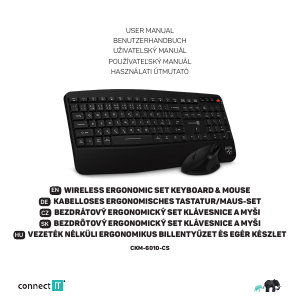
Manuál Connect IT CI-1129 Klávesnice

Související produkty

Související kategorie

×
Download